.jpg)
Efficient documentation management is key to productivity and business process control. OpenText Core Content Management offers an intuitive and fully customizable interface that facilitates access to documents, collaboration between teams and integration with business systems like SAP.
In this article, we show you what the Core Content interface looks like and how its functionalities can help your company to optimize document management.
Personalized home page with role-based folders
Core Content Homepage is designed to adapt to each user or workgroup according to their role within the organization. This means that each employee has access to:
• Tools and folders relevant to your function.
• Workspaces associated with business objects.
• Direct access to frequent documents and repositories.
For example, a Human Resources user will see information related to employees, candidates, or training. While a user of the Purchasing area will have access to suppliers, contracts and purchase orders.
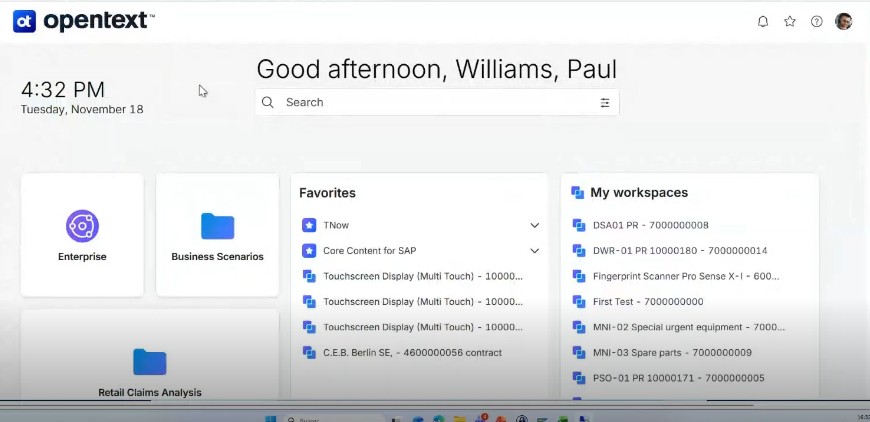
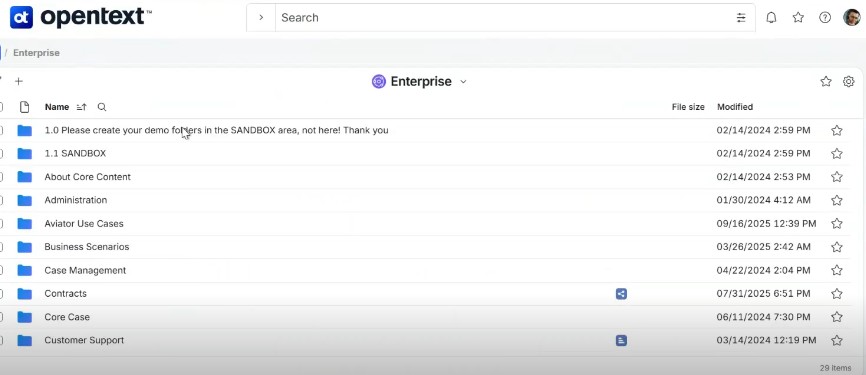
This customization allows each employee to quickly find what they need, without wasting time browsing through functionalities that do not belong to them.
Widgets and shortcuts from Core Content Management
The Core Content interface includes widgets and shortcuts that facilitate daily productivity.
For example:
- In Favorites you can save frequently used documents or folders.
- In My Workflows the workflows initiated by the user and their status (in progress, pending approval, etc.) are shown.
- Workspaces detail a representation of business objects, such as suppliers, contracts or customers. In fact, they are one of the most powerful features of OpenText Core Content that allows each object created in SAP (for example, a provider) to automatically generate a workspace in the document manager. This space includes: a predefined folder structure; Metadata associated with the object (name, address, telephone, etc.); Access permissions according to roles; Centralized and organized documents.
Thanks to workspaces, all the information related to a business object remains in a single repository, accessible from the manager or from the integrated application, avoiding duplication of information and ensuring that all users work on the same (and most recent) version.
-In My tasks you can have the list of pending actions within the flows.
In addition, users can customize their space, hiding or showing widgets according to their needs, without affecting the configuration of other employees.

Version management in digitized documentation
Core Content also allows you to create new versions of a document without losing the history of changes. As well as shortcuts or direct accesses to reach a document from multiple locations without duplicating it and automatic document retention policies to comply with data protection regulations.
These functionalities guarantee total control over the documentation, avoiding errors and ensuring the traceability of each action.
Seamless integration of CCM with SAP and other systems
One of the most important advantages of Core Content is its integration with business systems such as SAP. Through this type of seamless integration, each vendor, contract or employee created in SAP generates a corresponding workspace. In addition, documents and metadata are automatically synchronized and users can consult and update information without leaving SAP or the document manager.
This saves time, reduces errors and centralizes all documentation in a single repository.

Key benefits of the OpenText Core Content interface
• Improved productivity thanks to customization and shortcuts.
• Organized documentation linked to business processes.
• Version control and shortcuts to avoid duplicates.
• Automated workspaces integrated with SAP.
• Clear workflows and task tracking.
• Regulatory compliance through retention policies.
Together, the OpenText CCM interface allows companies to work more efficiently and securely, ensuring that documentation is always accessible and properly organized.
Optimize your document management with Brait
At Brait, we help organizations deploy and customize. OpenText Core Content Management, adapting the solution to your business processes and systems. Our experience allows integration with SAP, Microsoft 365, Salesforce and other applications to be fast and efficient.
In our department, totally dedicated to Document Management, we have a highly qualified team, certified in OpenText solutions and with extensive experience in this type of project, both for small and large companies.
If you want to discover how to optimize your company's document management and improve collaboration between teams, contact us and we'll show you how OpenText can transform your organization.
.jpg)